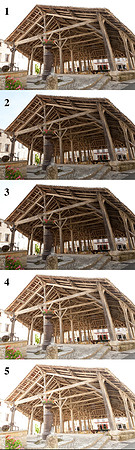
span class="large"It was 6 August 2010 and about 17:00 on a beautiful, cloudless day in Villebois Lavalette and I wanted to shoot emLes Halles/em in the town centre. There are Roman columns on the other side (to these five shots) of emLes Halles/em and it was actually those that i wanted to photograph...but the columns are getting damaged with age and a conservation project had just started and some of them have been boarded up. br/br/So....I walked round to the east side of emLes Halles/em, thus I was now facing west and directly into the sun. br/br/I set up my tripod and positioned myself low enough so as to see up and inside the roof's woodwok and as square as possible so as to get as much of emLes Halles/em in the shot - because of a building to my right (and out of shot) it's actually impossible to get 100% of this grand old structure into a single shot from where I stood.br/br/Via the camera's custom functions I'd already programmed the auto-bracket feature (for more on auto-bracketing, see here: a href="
http://www.studiolavalette.com/useful-resources"; target="_blank"http://www.studiolavalette.com/useful-resources/a) so using my remote shutter release I took these five shots. The first shot in an auto-bracket sequence is key as it determines the exposure/timings of the next four. The first shot was set to f/16 at 1/8 sec, thus the subsequent shots were:br/second = f/16 at 1/20 sec br/third = f/16 at 1/13 secbr/fourth = f/16 at 1/5 sec br/fifth = f/16 at 0.3 sec/span